
Complete Guide to Upay Deposits and Withdrawals for Online Gaming in Bangladesh
অফিশিয়াল প্রসেস টাইমলাইন
Operating as the fintech subsidiary of United Commercial Bank PLC (UCB), Upay is one of the most technologically advanced and secure mobile financial services operating in Bangladesh today. Launched with a state-of-the-art digital infrastructure, Upay distinguishes itself through its multi-tier cybersecurity architecture, competitive transaction tariffs, and direct integration with nationwide banking networks. For online entertainment and gaming enthusiasts, Upay provides a dependable, high-speed financial channel that serves as both a primary payment option and an essential alternative during maintenance windows on legacy networks.
Navigating online transactions through Upay requires understanding its distinct operational workflows, transaction limits, TrxID verification protocols, and mobile application interface. This comprehensive manual provides an in-depth walkthrough of depositing and cashing out funds via Upay, examines its underlying security infrastructure, outlines regulatory boundaries, and delivers essential troubleshooting strategies for players in Bangladesh.
The Strategic Advantage of Upay in Bangladesh
While bKash and Nagad account for the highest gross volume of mobile transactions nationwide, high transaction frequency often leads to server congestion, delayed SMS delivery, or scheduled maintenance during peak evening gaming hours.
| Feature Matrix | Upay (UCB Fintech) Advantage |
|---|---|
| Server Reliability During Peaks | High uptime, zero evening congestion |
| Underlying Banking Parent | United Commercial Bank PLC (UCB) |
| Cash Out Fee Structure | Highly competitive mobile rates |
| Transaction Verification | Instantaneous 10-character TrxID |
| Direct Bank Interoperability | Seamless integration with UCB Core |
By maintaining an active, verified Upay wallet alongside traditional payment methods, players ensure uninterrupted access to deposits and withdrawals, avoiding the frustration of network-wide delays on primary mobile carriers.
Transaction Parameters and Limits Overview
Understanding the operational boundaries of Upay ensures smooth, predictable transactions without unexpected administrative delays.
| Transaction Parameter | Official Standard Specification |
|---|---|
| Minimum Single Deposit | BDT 500 |
| Maximum Single Deposit | BDT 25,000 |
| Minimum Single Withdrawal | BDT 1,000 |
| Maximum Single Withdrawal | BDT 25,000 |
| Daily Account Transfer Limit | BDT 50,000 (Per Bangladesh Bank) |
| Monthly Account Transfer Limit | BDT 300,000 (Personal Account) |
| Average Processing Turnaround | 3 to 10 Minutes |
| Platform Transaction Fee | 0% (Completely Free) |
These transaction thresholds reflect official guidelines established by Bangladesh Bank for personal mobile financial accounts. High-volume players requiring higher capacity should consult our VIP Club Directory or review our USDT Cryptocurrency Guide.
Step-by-Step Walkthrough: Depositing Funds via Upay
Depositing funds into your DarazPlay account using Upay is straightforward. Follow this five-step sequence to ensure automatic crediting.
The 5-Step Upay Deposit Flow
Step 1: Open Cashier --> Select "Deposit" > Choose "Upay" Step 2: Copy Wallet Number --> Note the currently active receiving number Step 3: Open Upay App --> Execute "Cash Out" or "Send Money" Step 4: Record TrxID --> Copy the alphanumeric ID from confirmation Step 5: Confirm on Portal --> Submit sender number, sum, and TrxID
Accessing the Cashier and Selecting Upay
Log into your account via desktop browser or the DarazPlay App. Navigate to the cashier section in the top navigation bar, click on "Deposit," and select the Upay icon.
Retrieving the Dynamic Upay Receiving Number
The cashier screen will display the currently active platform Upay wallet number and specify the required transaction type: Agent Account or Personal Account.
- Important Security Reminder: Platform receiving accounts rotate continuously to manage liquidity flows across the banking network. Never save an Upay number in your mobile contacts to reuse later. Always copy the freshly generated number displayed on the active cashier screen.
Completing the Transfer via the Upay Mobile App
Open your official Upay smartphone application:
- Tap Cash Out (for agent accounts) or Send Money (for personal accounts) based on the instructions displayed in the cashier.
- Paste the platform Upay wallet number into the recipient field.
- Input the exact sum in Bangladeshi Taka that you wish to deposit.
- Leave the "Reference" or "Remarks" field completely blank to comply with anti-fraud safeguards.
- Enter your 4-digit Upay security PIN and tap and hold the screen to authorize the transfer.
Securing the Unique Transaction ID (TrxID)
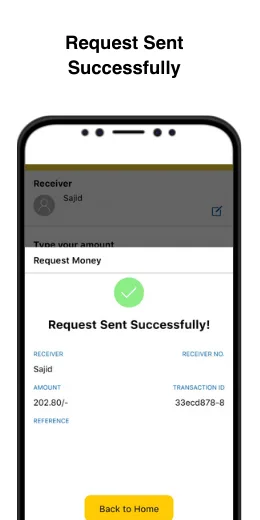
Upon transaction completion, the Upay application displays a digital receipt and dispatches an automated SMS confirmation to your registered phone number.
- Locate the field labeled TrxID (a unique alphanumeric sequence).
- Copy this code accurately. The TrxID represents your cryptographic proof of transfer, allowing the automated payment system to match your payment against incoming banking feeds.
Submitting the Verification Form on DarazPlay
Return immediately to the open cashier window:
- Confirm the exact deposit amount in BDT.
- Enter the personal Upay mobile number from which the transfer originated.
- Paste the TrxID into the designated verification field.
- Click Submit Deposit.
Under standard operational conditions, the automated matching engine reconciles your TrxID within two to five minutes, updating your playable balance immediately.
Step-by-Step Walkthrough: Withdrawing Funds via Upay
Cashing out your winnings back to your personal Upay wallet provides fast, secure settlement directly to your smartphone.
The 4-Step Upay Cashout Flow
Step 1: Open Withdrawal --> Select "Withdrawal" > Choose "Upay" Step 2: Specify Amount --> Input cashout sum (BDT 1,000 - 25,000) Step 3: Enter Account No. --> Input verified 11-digit personal Upay number Step 4: Receive Funds --> Balance reflects in your wallet in 5-15 min
Pre-Withdrawal Verification
Before submitting an Upay cashout request:
- Confirm that your account profile has completed identity verification in accordance with Fair Play and KYC Protocols.
- Ensure that any active promotional turnover requirements have been satisfied (or that your unbonded deposit has satisfied the standard 1x anti-money laundering turnover).
- Verify that the cashout is directed to the same personal Upay account used for prior deposits.
Submitting the Request
- Select Upay from the Withdrawal menu in the cashier.
- Enter the desired withdrawal amount in Bangladeshi Taka.
- Input your 11-digit personal Upay mobile number (e.g.,
01XXXXXXXXX). - Click Submit Withdrawal.
The transaction enters the automated dispatch queue. Following security verification, funds are transmitted directly to your Upay account. You will receive an official notification SMS confirming the newly credited balance.
Security Architecture and Account Hygiene
Upay incorporates advanced cybersecurity protocols backed by UCB's institutional banking standards. Maintaining rigorous personal account hygiene ensures that your financial accounts remain fully protected.
| Security Rule | Operational Requirement |
|---|---|
| Blank Reference Note | NEVER write sensitive terms like "casino," "bet," or |
| "DarazPlay" in transfer reference notes. | |
| Verified Personal Account | Transact exclusively from an Upay wallet registered |
| in your own legal name matching your Smart NID. | |
| SIM-Device Pairing | Ensure the registered SIM is physically present in |
| the handset running the Upay mobile app. | |
| Keep PIN Confidential | Never share your 4-digit Upay PIN with anyone. |
The Strict Reference Note Rule
The Upay mobile application provides an optional reference note field during transfers.
- Never enter sensitive sensitive terms such as "casino," "DarazPlay," "gambling," "bet," or "cricket" in this field.
- Telecommunications providers and financial compliance units monitor sensitive term logs using automated detection software. Typing gambling-related terms can lead to automated account freezes and regulatory inquiries.
- Leave this field completely empty, or enter a neutral numeric order code if required.
Troubleshooting Delayed Upay Transactions
While the vast majority of Upay transactions credit instantaneously, network latency or input errors can occasionally cause delays.
| Symptom | Likely Root Cause | Corrective Action |
|---|---|---|
| Balance not credited (15m) | Incorrect TrxID typed | Cross-check TrxID in app |
| Upay transfer failed | Daily limit reached | Check Bangladesh Bank caps |
| Money debited, no record | Network server delay | Contact 24/7 Live Support |
Contacting 24/7 Customer Support
If your deposit or withdrawal has not settled after fifteen minutes:
- Open your Upay application, navigate to the Transactions tab, and confirm that the transfer was successfully completed.
- Launch the 24/7 Customer Care Live Chat on the website.
- Provide the support specialist with:
- Your platform username
- Exact BDT transaction sum
- Sender Upay mobile number
- The full TrxID
- A screenshot of the Upay transaction confirmation
- Support agents will immediately trace the status on the payment gateway ledger and resolve any administrative bottlenecks.
Frequently Asked Questions
What makes Upay different from bKash and Nagad?
Upay operates directly under United Commercial Bank PLC (UCB), providing institutional banking security, robust server uptime during peak evening hours, and competitive cashout charges through UCB's nationwide network of agent points and branches.
Are there any fees charged by DarazPlay for Upay deposits or withdrawals?
No. DarazPlay processes all deposits and withdrawals with 0% platform commission. Any standard network charges associated with converting your digital Upay balance into physical cash at agent booths are levied directly by Upay.
Can I deposit using Upay USSD (*268#) without internet access?
Yes. You can dial *268# from any mobile handset to access Upay's USSD banking menu, complete Cash Out or Send Money transfers, and receive your confirmation SMS containing the TrxID.
Can I withdraw to an Upay agent account instead of a personal wallet?
No. Security protocols and mobile banking regulations strictly prohibit sending cashouts to commercial agent accounts. All withdrawals must be directed to verified personal Upay accounts.
What should I do if I accidentally enter an incorrect Upay number during withdrawal?
If the withdrawal request is still listed as "Pending," immediately contact Live Chat to request an urgent cancellation. However, if the status shows "Completed" and the transfer has already been executed on the telecom network, the funds cannot be recovered. Always review your account number before confirming.
Related Guides and Resources
- Payments Directory Hub - Master overview of all supported payment methods, limits, and processing times.
- bKash Deposit Guide - Complete funding instructions using Bangladesh's leading MFS provider.
- Nagad Withdrawal Guide - Fast cashout procedures using the Post Office digital wallet.
- Fast Withdrawal Optimization - Proven techniques for achieving rapid, reliable cashouts.
- Responsible Gaming Tools - Set deposit caps, session timeouts, and maintain healthy gaming habits.
Frequently Asked Questions
Upay operates directly under United Commercial Bank PLC (UCB), providing institutional banking security, robust server uptime during peak evening hours, and competitive cashout charges through UCB's nationwide network of agent points and branches.
No. DarazPlay processes all deposits and withdrawals with 0% platform commission. Any standard network charges associated with converting your digital Upay balance into physical cash at agent booths are levied directly by Upay.
Yes. You can dial `*268#` from any mobile handset to access Upay's USSD banking menu, complete Cash Out or Send Money transfers, and receive your confirmation SMS containing the TrxID.
No. Security protocols and mobile banking regulations strictly prohibit sending cashouts to commercial agent accounts. All withdrawals must be directed to verified personal Upay accounts.
If the withdrawal request is still listed as "Pending," immediately contact Live Chat to request an urgent cancellation. However, if the status shows "Completed" and the transfer has already been executed on the telecom network, the funds cannot be recovered. Always review your account number before confirming. ---